

How to check if a website is legit Start by reading the exact web address, then independently verify who operates the site, check its reputation, and review how it handles payments or personal information. Use a reputable URL checker as an extra signal—not as proof that a seller is trustworthy.
If you have arrived at an unfamiliar online store from a social media ad, received a suspicious sign-in link, or found an offer that seems unusually cheap, this guide shows you what to check before entering your password, credit card, or other personal details.
Reviewed: October 22, 2026 · By: The Circuit Edit Editorial Team · Approach: Consumer-protection guidance, official security-tool documentation, and fictional training examples. We have not published unverified live scanner test scores.
The 60-Second Website Trust Check
A fast first screen before you click, sign in or pay.
Read the full domain. Identify what the page wants you to do and how you reached it.
Find the real business through a separate source; check reputation and contact details.
When you cannot verify the seller or the request, leave. Do not gamble with your credentials or money.
This is a quick screening routine, not a certified test or a guarantee of safety. High-value transactions deserve more thorough research.
How to Check If a Website Is Legit: 10 Practical Checks
Use these checks together. Any one of them can be misleading; the pattern of evidence matters more than a single padlock, rating or attractive homepage.
1. Read the exact domain name—not just the company logo
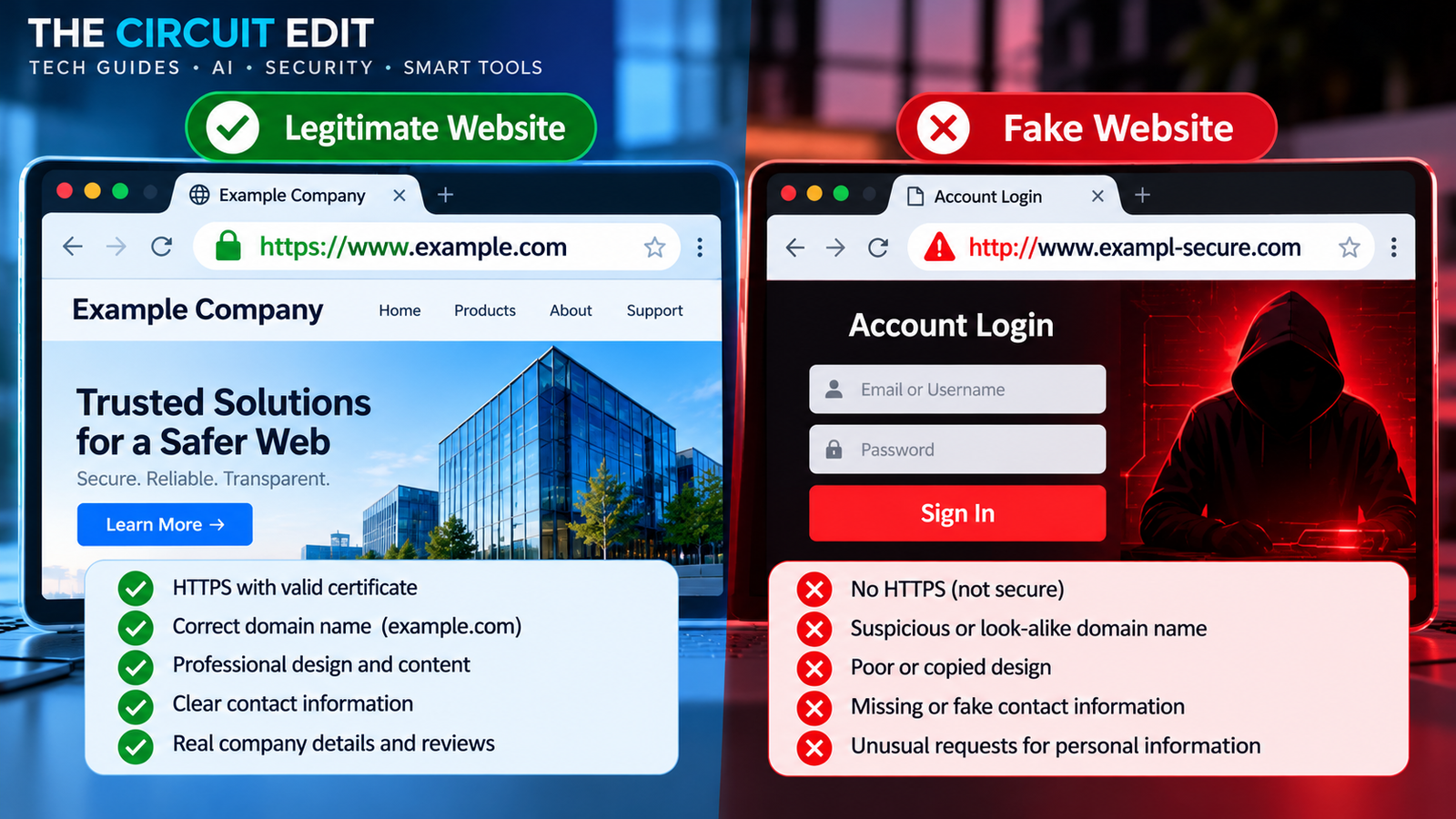
The address bar is often more revealing than the page design. A fraudulent site can copy a logo and layout, but its address may point to a different domain. Look for extra words, transposed letters, lookalike characters and misleading subdomains.
https://shop.examplehttps://shop.example.security-check.testFictional teaching domains: in Example B, the registered domain would be security-check.test, not shop.example. Both .example and .test are reserved for examples; these are not accusations against live websites.
Practical step: On desktop, click the address bar to see the full URL. On mobile, tap it to inspect the destination. For an account you regularly use, navigate through a bookmark or the official app rather than a link you were sent.
2. Check how you arrived at the website
Was the link sent in an unsolicited email, text, messaging app, QR code or social media advertisement? That context matters. Scammers buy advertisements and mimic legitimate promotions; seeing a site in an ad or search result does not verify the merchant. In August 2026, the FTC reported that consumers had reported more than $95 million in 2025 losses to scams involving purchases made after seeing social media ads. That figure describes the specified reported loss category—not all fake website losses.
Practical step: Search for the organization independently. Find its known website and confirm that the product or offer appears there. Avoid signing in through unexpected message links.
3. Understand HTTPS, the browser’s security indicator and warnings
HTTPS means that information is encrypted in transit between your browser and the site. It does not mean the shop will deliver an item, honor a refund, or even represent the company it claims to be. Scam sites can use HTTPS, too. The FTC’s online shopping guidance makes this distinction explicitly.
Important distinction: “Encrypted connection” is a technical property. “Trustworthy business” requires independent evidence. If your browser displays a full-page dangerous-site or insecure-connection warning, do not bypass it to shop or sign in.
Practical step: If Chrome displays a warning about a dangerous site, leave it. For routine sites, check both the connection indicator and the spelling of the domain. See Google’s explanation of site security indicators.
4. Look up the domain’s registration history
Domain registration data can provide useful context. At ICANN Lookup, enter the domain itself (for example, example.com, not the entire shopping URL). Depending on the domain and available records, you may see registration and update dates, the registrar, or other registration details.
A brand-new domain claiming decades of uninterrupted trading deserves extra verification. However, new does not automatically mean fraudulent, and older domains can be compromised or change ownership. Privacy-redacted registration information is also not proof of wrongdoing. ICANN now uses the Registration Data Access Protocol (RDAP) as the principal system for retrieving generic top-level domain registration data.
5. Check the URL with a reputable security tool
Tools such as Google Safe Browsing, Malwarebytes Scam Link Check, and VirusTotal can show whether a URL has known security warnings or reputation signals. These tools focus on different things: malware, phishing, threats, reports and historical reputation. None can conclusively establish that a shop is honest or will fulfill an order.
Practical step: Start with a known provider’s official tool rather than clicking a “free website scanner” advertisement. If you receive a result that says “not flagged” or “no detections,” continue with the business and payment checks below.
6. Verify the company behind the website
Find a real business name, contact details and a support process. Then verify those details outside the site’s own pages. Does the address correspond to a plausible business? Is the listed phone number associated with that company in independent directories? Does its official social account link back to the same domain?
Not every legitimate small business publishes a street address or answers the phone immediately. The issue is whether its identity and commitments are verifiable, not whether every field on a checklist is populated.
7. Read independent reviews—and investigate the pattern
Search for the exact domain and business name with words such as reviews, complaints, refund or scam. Compare several independent sources. Look for detailed accounts of delivery, customer support, surprise fees and refunds rather than treating a five-star average as proof.
Reviews can be purchased, fabricated or manipulated; a lack of reviews may simply mean a business is new. The FTC advises examining sellers and reviews critically, including the history of reviewers and whether incentives might influence their comments.
8. Review prices, returns and subscription terms
Compare the advertised price with other reputable retailers. Large discounts can be genuine, but a permanent “90% off” promotion coupled with pressure to pay immediately calls for skepticism. Check the final checkout total, shipping charges, refund deadlines, cancellation rules, recurring payments and the party responsible for returns.
A crucial distinction: Some websites are not technically malicious but may use misleading subscription terms, unexpected recurring charges or poor customer-service practices. A malware scan is unlikely to answer those consumer-protection questions.
9. Choose a payment method with meaningful protection
For online purchases, a credit card generally offers stronger avenues to dispute qualifying charges than an irreversible transfer; exact rights vary by country and payment provider. Treat sellers who insist on gift cards, cryptocurrency or unusual transfers as a major warning sign. Be cautious if someone asks you to pay outside a marketplace’s official checkout, since this may remove the platform’s buyer protections.
The FTC recommends credit cards where possible and warns against merchants who insist on payment methods that make refunds difficult.
10. Make a decision based on the combined evidence
You do not have to prove that a site is fraudulent before deciding not to use it. If something cannot be verified, there is no obligation to enter a password or risk a purchase. A useful decision framework is:
Browser danger warning, lookalike login domain, requested one-time code, or pressure to pay irreversibly.
New domain, few independent reviews, inconsistent contact details or unclear refund terms.
Identity checked independently, terms understood, no serious red flags and payment protections available.
Remember: “Proceed cautiously” is not a certification of safety. Every unfamiliar purchase still carries some risk.
Best Free Website Checkers: What Each One Actually Tells You
These five tools have different purposes. The following descriptions are based on their official help pages and documentation, reviewed in October 2026—not on a controlled test of their accuracy or a claim that we scanned live scam domains.
| Tool | What to check | What it cannot prove |
|---|---|---|
| Google Safe Browsing | Whether Google’s known threat-detection system reports unsafe website behavior. | A missing warning is not a seller endorsement; newly created scams may not yet be identified. |
| Malwarebytes Scam Link Check | Paste a URL to inspect threat signals, available reputation data and a site preview where supported. | Its result cannot guarantee that products will arrive or a refund will be honored. |
| VirusTotal | Examine URL detections and reports from multiple security partners. | Zero detections are not proof of legitimacy. Do not submit URLs containing private tokens or sensitive personal data to public scanning. |
| ICANN Lookup | Explore available RDAP registration information and dates for a domain. | Registration age and redacted owner details do not identify whether a seller is honest. |
| ScamAdviser | Review automated trust indicators and available reputation signals. | Its trust score is an estimate, not a verdict; legitimate new sites can be scored cautiously. |
How to use the results without misreading them
- A clear warning: Take it seriously. Avoid entering information and independently confirm the domain.
- No warning: This is inconclusive. Continue checking the real business, policies and payment options.
- Mixed results: Do not average the colored badges into a false certainty. Look at what each tool actually detected.
- A private URL: If a link contains a password reset token, personal order details or a unique login session, do not paste it into a public analysis tool. Open the legitimate service directly instead.
Editorial distinction: Malwarebytes, Google and VirusTotal assess security-related signals; ICANN provides domain-registration context; ScamAdviser estimates broader trust risk. They answer different questions, so they should not be presented as a single definitive “safe/unsafe” test.
Three Website Scenarios: Apply the Checks
The following examples are fictional learning scenarios. The examples illustrate how to reason about suspicious pages; they are not accusations about real companies or actual websites.
Scenario 1: The designer store with an unbelievable sale
You see a social media advertisement for shoes at 85% off. The site has polished photos, HTTPS and a countdown timer—but the business name is unfamiliar and its refund policy is vague.
Apply the checks: Search for the retailer independently, compare prices, inspect the domain, find external reviews and confirm return terms. If the seller only accepts cryptocurrency or gift cards, walk away. A padlock does not settle the question.
Scenario 2: A login page that uses the real brand’s colors
An email says you must confirm a password immediately. The linked page has the company’s logo and a realistic sign-in form, but the actual domain is a different business’s address.
Apply the checks: Stop before typing anything. Close the tab and open the account through your normal bookmark or app. A familiar interface and urgent wording are not proof of authenticity.
Scenario 3: A real-looking store with hidden recurring fees
A website is not flagged by a malware scanner. However, the checkout mentions a low-cost “trial” while the terms disclose a recurring monthly subscription that is difficult to cancel.
Apply the checks: The central issue is billing transparency, not necessarily malware. Read the full price and cancellation policy before paying. If the terms are misleading or unverifiable, do not proceed.
What Website Checkers Cannot Detect Reliably
Even good security tools have limits. A site that has not been reported yet may show no warnings. Some fraudulent businesses deliver low-quality goods rather than distributing malware. Others misuse a legitimate seller’s name, create deceptive checkout conditions, or take payment and stop responding.
- New threats: Detection systems may not yet know a brand-new phishing domain.
- Legitimate-site compromise: A genuine business website can temporarily host malicious content after a breach.
- Merchant disputes: A scanner cannot reliably predict shipping performance, product quality or refund cooperation.
- Incomplete reputation: Lack of reviews, young domains and redacted registration data can have benign explanations.
- AI-polished design: Good spelling, professional product photos and elegant interfaces no longer prove much on their own.
That is why the safest approach is independent verification plus informed payment decisions, not simply scanning a URL until one tool shows green.
What to Do if You Already Paid or Signed In
If you entered a password
Navigate to the legitimate account through its official address, change the password immediately, sign out of unknown sessions if possible and enable multi-factor authentication. If the password was reused elsewhere, change those accounts as well. Contact the service provider if access has been lost.
If you entered card information or paid
Contact your bank or card issuer promptly using the number on the card or official app. Explain the situation and ask about freezing or replacing the card, disputing the charge and monitoring unauthorized activity. Preserve receipts, transaction records, order confirmations and communication with the seller.
If a site downloaded software or asked for remote access
Stop interacting with it, run current security checks and contact trusted technical support. If this happened on a work device, notify your IT team. If identity information was exposed, follow the recovery advice applicable to your country.
For U.S. readers, see the FTC’s recovery guide and ReportFraud.ftc.gov. Canadian readers can report suspected fraud to the Canadian Anti-Fraud Centre.
Frequently Asked Questions
How can I check if a website is legit for free?
Inspect the full domain, verify the business through independent sources, read reviews and return terms, and use reputable free tools such as Google Safe Browsing or Malwarebytes Scam Link Check as additional evidence. None of these checks alone guarantees that a website is legitimate.
Does HTTPS mean a website is safe to buy from?
No. HTTPS encrypts the connection but does not verify the business’s honesty, shipping practices or refund policy. Scam websites can also use HTTPS.
Can a website be fake even if it appears in Google search?
Yes. Appearing in search results or advertisements is not a certification of the seller. Verify the actual domain and business independently before entering sensitive information.
Is a new website domain always a scam?
No. Every legitimate new business starts somewhere. Treat recent registration as context rather than a verdict, and look for additional independent signs of legitimacy.
Can VirusTotal or Google Safe Browsing guarantee a site is legitimate?
No. Their checks focus on particular threat signals. A site may not be listed yet, and being free of known malware does not ensure a seller delivers purchases or honors its policies.
What is the safest way to pay on an unfamiliar website?
First, verify the merchant and its terms. If you decide to proceed, use a payment method with meaningful buyer protection, often a credit card, and avoid sellers insisting on gift cards or irreversible transfers. Protections vary by country and provider.
What should I do if I entered my password on a fake website?
Use the official service to change your password immediately, secure other accounts that use the same password, review sessions, enable multi-factor authentication and contact the provider if necessary.
Sources and Editorial Method
This article synthesizes consumer-security guidance and tool documentation to create an original inspect → verify → decide framework. The three website scenarios and URL diagram are fictional educational reconstructions. Product capabilities were reviewed from official documentation on October 22, 2026. We have not run a controlled live detection benchmark or independently verified vendor accuracy claims; no tool should be interpreted as providing a guaranteed safety certificate.
- U.S. Federal Trade Commission — Online Shopping
- FTC — Buying From an Online Marketplace
- FTC — Are Social Media Ads Vetted for Scams? (2026)
- Canadian Centre for Cyber Security — Shopping Online Safely (2026)
- Google — Safe Browsing FAQs
- Malwarebytes — Scam Link Check documentation
- VirusTotal — How It Works and URL submission privacy note
- ICANN — Registration Data Access Protocol (RDAP) information
- ScamAdviser — Trust Score and FAQ
- FTC — What to Do if You Were Scammed
Maintenance note: Review tool availability, policy links, and the single dated FTC statistic at least annually. The central URL, seller and payment checks are intended to remain useful across years.
📖 RELATED READING
Phishing Email Examples (2026): 15 Realistic Scams and How to Spot Them →Discover 15 realistic phishing scams and learn how to recognize fake login pages, suspicious emails, and fraudulent payment requests.
Website Safety Checker
Review a website's warning signs before you sign in, pay, or share personal information.
This is a guided safety assessment, not a live malware scan or security certification. Do not enter passwords or payment details.
[…] Find the primary source. Open the standards body, official documentation, original paper, regulator or provider’s current help article. A search snippet or a second chatbot answer is not proof. For more guidance on evaluating unfamiliar sources, read our guide to checking whether a website is legitimate. […]
[…] How to Check If a Website Is Legit — 10 Checks →Phishing Email Examples — What to Watch For → THE BOTTOM LINE […]